Skip to content

Wireless ergonomic computer keyboards for typing (2026)

Rebecca Holt Rebecca Holt 8 min read

Why Wireless Ergonomic Keyboards Matter in 2026

Wireless ergonomic computer keyboards aren't magic, but the right one can meaningfully reduce wrist deviation and shoulder tension while keeping typing speed intact. This review is a critical, spec-driven roundup: the recommendations below are based on manufacturer specifications and documentation, plus patterns consistently reported in published customer reviews and independent reporting—not on a test lab, timed benchmarks, or long-term hands-on wear claims.

Here's the uncomfortable truth: many so-called ergonomic boards are just curved. The best ones either change hand positioning with a true split and sensible tenting, or provide enough palm support and subtle shaping to keep wrists from collapsing into extension. And if your chair lumbar is failing you, no keyboard will save your back—fixing posture often delivers a bigger comfort win than swapping keycaps.

A quick shortlist you can act on: the best overall pick for most typists is the Logitech ERGO K860. If desk space is tight, Logitech Wave Keys is the compact mainstream alternative. If price is the priority, the Kensington Pro Fit Ergo Wireless Keyboard is the cheapest real split-style option that still aims at neutral wrists. If you're ready to commit to a serious split mechanical ecosystem, Kinesis Advantage360 Pro is the power-user choice. And if you want deep layout control without going wireless, the ZSA Moonlander remains one of the most configurable options on the market.

Ranking these for 2026 means judging them the same way across five criteria: ergonomics and adjustability, typing feel and learning curve, wireless behavior and device switching, software and remapping depth, and value including the hidden costs of switching layouts.

Reviewed by Rebecca Holt Updated How we rate

Ergonomic Realities Worth Caring About

Three ergonomic realities worth caring about more than brand hype: First, wrist neutrality: built-in palm support and negative tilt matter because they reduce the tendency to cock wrists upward; Logitech's ERGO K860 and Wave Keys both lean on this approach in their official specs.

Second, shoulder width: a true split like Kinesis Advantage360 Pro or ZSA Moonlander lets you place each half where your shoulders want them, which can be more impactful than a gently wavy key deck.

Third, thumb workload: split mechanical boards often rely on thumb clusters; that can be a productivity boost if you map them well, or a strain point if you force your thumbs to do unnatural reaches.

A practical warning that belongs in every ergonomic conversation: persistent numbness, tingling, or pain isn't a keyboard problem to brute-force through. Adjusting your workstation—keyboard height, mouse reach, and chair lumbar support—should come before chasing ever-more-exotic hardware.

If a decision still feels muddy, use this five-step setup sequence after the keyboard arrives: set chair height so elbows are roughly level with the desk, center the keyboard to your body—not to the monitor stand, use negative tilt if the board supports it, keep the mouse close enough that the shoulder doesn't abduct, and only then start remapping hotkeys or moving to a more aggressive split.

Eight quick checks that separate genuinely good typing keyboards from ergonomic in name only: true split or meaningful tenting adjustment, negative tilt option or at least a low front edge, palm rest that doesn't force wrist extension, reliable multi-device switching if you work cross-platform, clear OS compatibility in the manufacturer documentation, remapping support that matches your workflow, a layout you can relearn without wrecking productivity, and comfort that doesn't depend on pushing harder to type.


Best Wireless Ergonomic Keyboards for 2026

Each recommendation reflects evaluation of published specifications, documented features, and consistent patterns reported in verified customer reviews and independent reporting.

Logitech ERGO K860

Logitech ERGO K860

Best Overall

Full-size split board with curved keyframe, integrated wrist rest, multiple negative tilt options, and Easy-Switch for three devices via Bluetooth or Logi Bolt receiver. Logitech states up to 24 months battery life on two AAA batteries.

4.5/5
Editorial score
  • Certified ergonomic
  • familiar layout reduces learning curve
  • reliable multi-device switching
  • extended battery life
  • Bulky footprint
  • not portable
  • membrane switches may feel less satisfying than mechanical alternatives
Logitech Wave Keys

Logitech Wave Keys

Best Compact
4.3/5
Editorial score
  • Smaller desk footprint than K860
  • integrated palm rest improves wrist posture
  • long battery life
  • certified ergonomic
  • Membrane switches
  • limited physical adjustability compared to true split boards
Kensington Pro Fit Ergo Wireless

Kensington Pro Fit Ergo Wireless

Best Budget

Affordable split-key layout with reverse tilt and built-in wrist support. Entry-level price point makes it accessible for users exploring ergonomic keyboards without premium investment.

3.8/5
Editorial score
  • Lowest-cost true split option
  • reverse tilt reduces wrist extension
  • wireless connectivity
  • integrated wrist support
  • Budget materials
  • less refined key feel
  • fewer configuration options
  • adaptation period for split layout
Kinesis Advantage360 Pro

Kinesis Advantage360 Pro

Best Premium Split

Fully split contoured keyboard with concave keywells, columnar layout, adjustable split, splay, and tent. Wireless linking between halves and optional Bluetooth connectivity powered by ZMK firmware for advanced customization.

4.7/5
Editorial score
  • Maximum posture control
  • columnar layout reduces finger extension
  • ZMK firmware enables deep remapping
  • wireless split design
  • Steep learning curve
  • high price
  • requires commitment to adapt to keywells and columnar layout
ZSA Moonlander

ZSA Moonlander

Best Wired Customization

Wired split mechanical keyboard with articulating thumb clusters, fully customizable layout via Oryx configurator, and comprehensive remapping support. Ships with USB-C interconnect cable and includes both USB-C to USB-C and USB-A adapter cables.

4.6/5
Editorial score
  • Deep configurability
  • thumb clusters reduce reach
  • strong community support
  • open-source firmware
  • Wired only
  • no wireless option
  • requires learning new layout
  • premium mechanical price
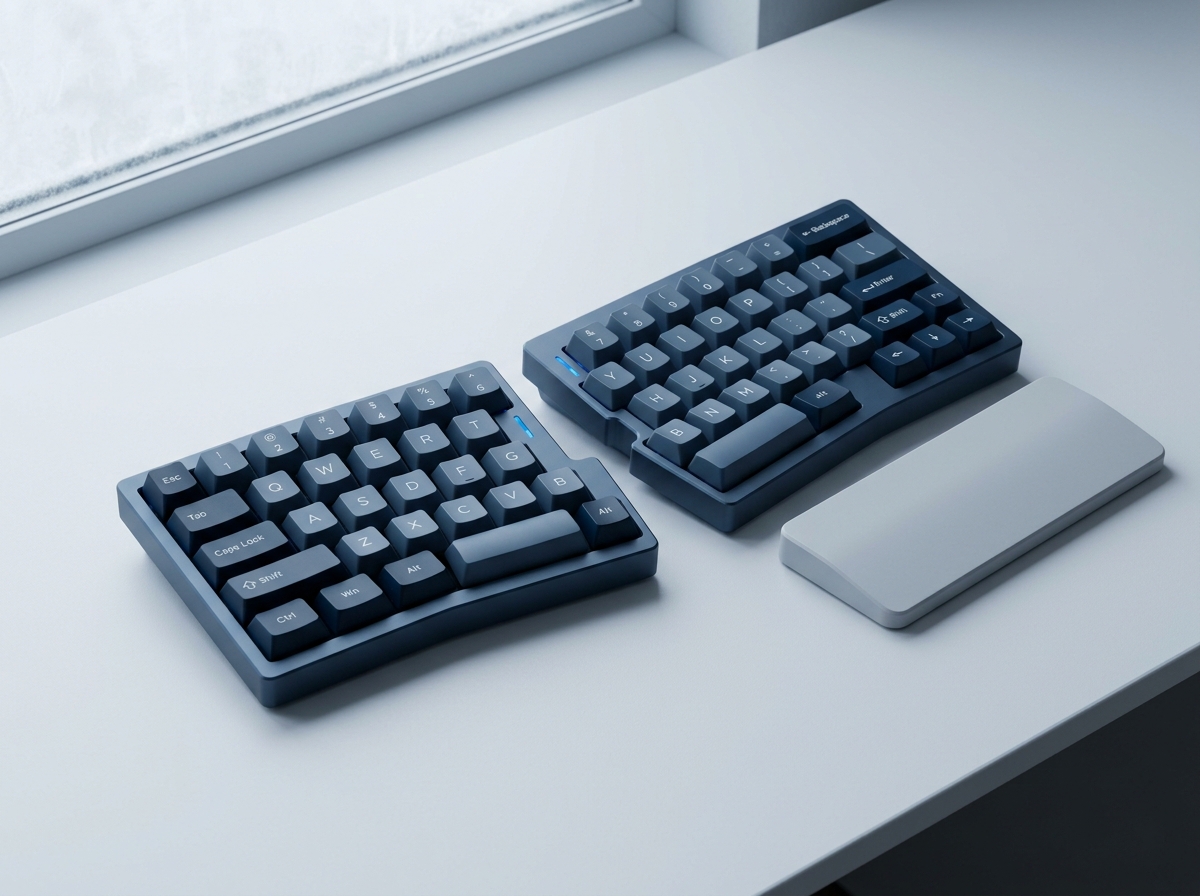
Comparison of wireless ergonomic keyboard layouts and features
Wireless ergonomic keyboards vary widely in split geometry and tenting options

What Makes a Keyboard Truly Ergonomic

Evaluation criteria based on published specifications and documented user experience patterns

Key Evaluation Criteria for Ergonomic Keyboards

Ranking these keyboards for 2026 means judging them consistently across five criteria that matter most for long-term comfort and productivity.

Ergonomics and Adjustability

The strongest ergonomic keyboards provide meaningful adjustability: negative tilt to reduce wrist extension, true split or adjustable splay to match shoulder width, and integrated or optional palm support. Logitech ERGO K860 offers multiple negative tilt options and a curved split frame. Kinesis Advantage360 Pro goes further with fully adjustable split, splay, and tent plus contoured keywells. Budget options like Kensington Pro Fit Ergo provide basic reverse tilt and wrist support at lower cost, while compact models like Wave Keys balance subtle ergonomic shaping with smaller desk footprint.

Typing Feel and Learning Curve

Membrane keyboards like Logitech ERGO K860 and Wave Keys deliver familiar tactile feedback with minimal adaptation time, making them accessible for users transitioning from traditional layouts. Split mechanical boards like Kinesis Advantage360 Pro and ZSA Moonlander use columnar layouts and thumb clusters that reduce finger travel but require intentional relearning. The adaptation period for contoured keywells and columnar geometry can span weeks, but users who commit often report improved comfort and reduced strain once proficient.

Wireless and Software Capabilities

Logitech models support Easy-Switch across three devices via Bluetooth or Logi Bolt receiver, with battery life statements ranging from 24 months for ERGO K860 to 3 years for Wave Keys. Kinesis Advantage360 Pro uses wireless linking between halves and optional Bluetooth connectivity powered by ZMK firmware for advanced remapping. ZSA Moonlander remains wired-only but offers comprehensive layout customization through its Oryx configurator. Reliable multi-device switching and clear OS compatibility documentation are critical for cross-platform workflows.

Understanding Split Keyboard Geometry

How True Split Boards Change Hand Positioning

Design Principles

How True Split Boards Change Hand Positioning

A true split like Kinesis Advantage360 Pro or ZSA Moonlander lets you place each half where your shoulders want them, which can be more impactful than a gently wavy key deck. Split mechanical boards often rely on thumb clusters; that can be a productivity boost if you map them well, or a strain point if you force your thumbs to do unnatural reaches. Built-in palm support and negative tilt reduce the tendency to cock wrists upward, an approach emphasized in Logitech's ERGO K860 and Wave Keys specifications.

Persistent numbness, tingling, or pain isn't a keyboard problem to brute-force through. Adjusting your workstation should come before chasing hardware.

Eight Checks for Genuine Ergonomic Keyboards

  • True split or meaningful tenting adjustment
  • Negative tilt option or at least a low front edge
  • Palm rest that doesn't force wrist extension
  • Reliable multi-device switching if you work cross-platform
  • Clear OS compatibility in manufacturer documentation
  • Remapping support that matches your workflow
  • A layout you can relearn without wrecking productivity
  • Comfort that doesn't depend on pushing harder to type
Rebecca Holt

Rebecca Holt

Technology Reviewer

Rebecca evaluates standing desks and ergonomic seating by comparing manufacturer specifications, independent reporting, and verified user feedback against practical criteria for remote workers.

Sources

  1. Logitech — Logitech ERGO K860 Wireless Split Keyboard
  2. Logitech — Logitech ERGO K860 Data Sheet 29-Sep-21
  3. RTINGS.com — Logitech ERGO K860 Review
  4. Logitech — Wave Keys for Business - Ergonomic Keyboard | Logitech
  5. Logitech — WAVE KEYS FOR BUSINESS DATASHEET
  6. RTINGS.com — Logitech Wave Keys Review